I recently published a new project on GitHub: Python Games Collection.
At one level, it is exactly what it sounds like. A collection of small arcade, puzzle, and card games built with Python and pygame.
At another level, it is what happens when you give yourself an excuse to experiment with AI coding tools and refuse to stop when it probably would have been reasonable to stop.
What the project is
This project brings together 15 playable games behind a single menu launcher. There is a mix of action, puzzle, and card games, enough variety to feel like an actual collection instead of a folder full of half finished ideas.
The goal was not to build anything groundbreaking. It was to build something that actually runs, is somewhat organized, and does not immediately fall apart when you press a button.
Low bar, but an important one.
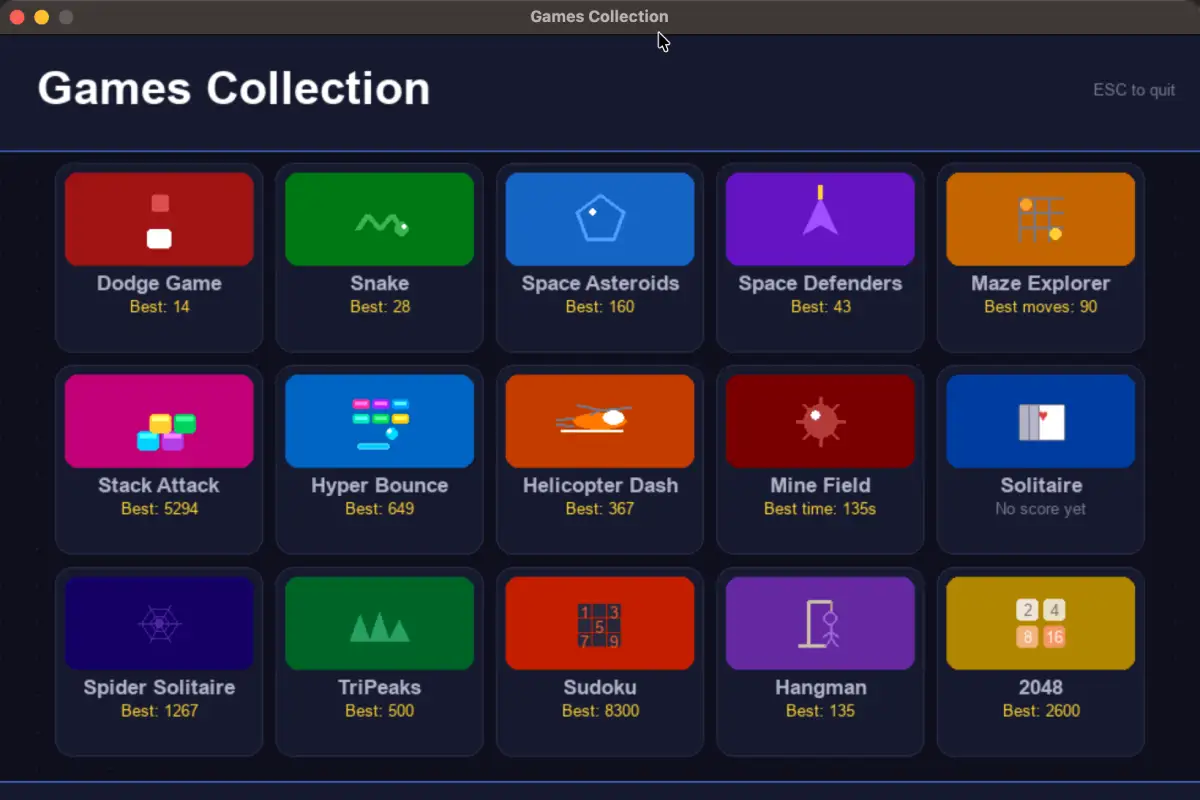
Why I built it
Part of the motivation was simple. Building games is fun.
The other part was curiosity. I wanted to see how far I could push a real Python project using AI as part of the workflow without completely losing control of what was happening.
Spoiler: you do not lose control, but you do need to pay attention.
Using AI like a coding debate team
One of the more interesting parts of this project was that I did not rely on just one AI.
I used both ChatGPT and Claude and essentially had them bounce ideas off each other.
Claude was very strong technically. It was especially good at writing clean chunks of code and getting the structure right on the first pass.
ChatGPT was no slouch either. It was particularly good at reasoning through problems, spotting issues, and suggesting improvements. More than once, I took code from Claude, ran it past ChatGPT, and it came back with something along the lines of, “this works, but here are three things that will break later.”
And it was usually right.
That back and forth turned out to be really useful. One would generate, the other would critique, and somewhere in the middle was code that actually held together.
It felt less like using a tool and more like managing two very fast, slightly opinionated junior developers who never sleep.
What AI was actually good at
AI was great at keeping momentum going.
It helped with repetitive patterns, pygame structure, quick iterations, and getting past those moments where you stare at your screen and wonder why something that should work absolutely does not.
It is very good at getting you 80 percent of the way there quickly.
The last 20 percent is still on you.
What still required human input
This is the part that AI does not solve.
AI does not know what feels fun.
It does not know when something is unnecessarily complicated.
It does not know when to stop adding features.
It will also confidently give you code that looks correct and is not.
There is still a lot of value in running things, breaking them, fixing them, and making decisions about what actually belongs in the project.
About this project
This started as a personal project to mess around with Python and AI assisted coding and ended up as something my kids and I could actually sit down and play together without needing wifi, a subscription, or an app store.
Nothing fancy, just a bunch of games that run locally and do not phone home.
Which, in 2026, feels like a feature.
And honestly, that part matters more to me than anything else in the repo.
Why I like this kind of project
Projects like this hit a nice balance. They are fun, but they still force you to deal with real programming problems.
You run into game loops, event handling, state management, collision logic, menus, and the slow realization that organizing code matters more than you hoped it would.
And when AI is part of the process, you also learn a different skill entirely. How to ask better questions, how to verify what you are given, and how to recognize when something sounds right but is not.
The bigger takeaway
AI coding tools are genuinely useful.
But they work best as assistants, not replacements.
They help you move faster, explore ideas, and avoid getting stuck on small things. But the direction, the quality, and whether the project is actually any good still comes down to you.
Also, if you are using two AIs at once, you will occasionally feel like a referee.
Try it out
If you want to check it out, download it, or build on it, you can find it here:
Python Games Collection on GitHub
If you find it useful, fun, or want to extend it, go for it.