In security, most of our effort goes into reducing exposure. We patch systems, harden configurations, and try to eliminate unnecessary access wherever possible. That is the job. Every once in a while, though, it is useful to take a different approach. Instead of closing everything, you leave something open on purpose and observe what happens.
This started with a simple question I kept coming back to. If I expose a link that no one should be accessing, who actually interacts with it? I was not looking for something buried in logs or surfaced later through a SIEM. I wanted something immediate. Something I could watch directly. So I created a basic endpoint with a unique path and logged every request that reached it.
I expected the link would eventually be accessed. A crawler or scanner would find it at some point. What I did not expect was how quickly that would happen.
The link was accessed almost immediately. Not after someone had time to read or interact with anything. The request came in fast enough that it clearly was not human. The source was not a typical user environment either. It came from cloud infrastructure and used generic or inconsistent user agents. At that point, it was obvious what I was looking at.
We tend to treat a click as a user action. In many cases, that assumption holds. But when you watch the interaction directly, the difference stands out. Some requests happen instantly, originate from infrastructure, and look generic. Others take time, come from expected environments, and behave more like real users. They all show up the same way in a log, but they are not the same thing.
Even with a small dataset, patterns show up quickly. The same networks appear more than once. Multiple tokens get accessed in sequence. Some links are touched before a user would realistically have time to see them. You do not need a large volume of data to notice it.
Here is an example of what that looks like in practice:
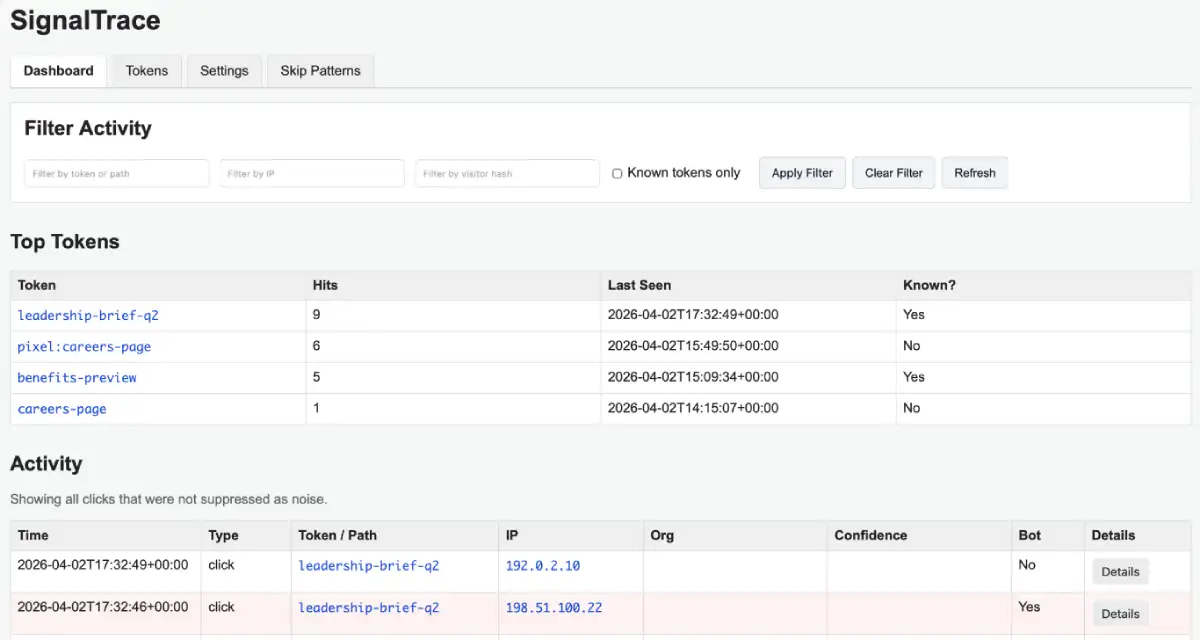
Example dashboard showing token activity and request patterns.
This becomes important in places where it is easy to misinterpret what you are seeing. Phishing simulations are a good example. When a link is accessed, it is easy to assume a user clicked it. In reality, the request may have come from an email security platform, a sandbox, or another automated system. Without additional visibility, those events all look identical.
The same applies to honeypots and reconnaissance. Exposed endpoints do not stay untouched for long. They are discovered and accessed, often quickly and sometimes repeatedly. A lightweight honeypot gives you a direct way to observe that behavior instead of trying to piece it together later.
This eventually turned into a small tool, which I called SignalTrace. The design stayed intentionally simple. PHP and SQLite. No external dependencies. Minimal setup. The goal was not to build a full analytics platform. I wanted something that could be deployed quickly and provide immediate visibility.
A few things stood out right away. Automated interaction is constant, even when nothing appears to be happening. Timing is one of the easiest signals to trust. Requests that occur immediately are rarely human. And you do not need a complex system to learn something useful. A small tool with a clear purpose is often enough.
If you want to take a look or try it yourself, it is available here:
https://github.com/veddegre/signaltrace
It takes only a few minutes to get running, and you will start seeing interactions almost immediately.
We spend a lot of time trying to prevent access. There is also value in controlled exposure. If something is left open, even briefly, it will be accessed. Watching that interaction can tell you more than blocking it ever would.